Tesco Payslipview – OurTesco and MyTesco Login.
Welcome to Tesco Payslip View. Checking your Tesco payslips online, from home or from your mobile phone, has never been easier.
This is how you check your lastest Tesco Salary slips from OurTesco online, or from the MyTesco Colleague App.
For specific questions, please see our FAQ section, where all your questions are answered about the updated Tesco Payslipview system.
Learn how to use the Tesco Payslip website to see your current and past payslips and hours, to find activation codes, or how to change your employee contact information.
This website is intended as a help resource for past and current Tesco employees. Use our guides to learn how to view your payslips, apply for activation codes and receive your P45 and P60.
For the ‘Quick Login’ guide, see Tesco Payslipview Login.
Table of contents
- Tesco Payslipview - OurTesco and MyTesco Login.
- Tesco Payslip View Account Registration.
- Tesco Payslipview Login.
- OurTesco.com Account Registration.
- Our Tesco Login.
- Payslipview.com and OurTesco.com Login Problems
- Your Tesco Payslip Explained.
- Getting Your Tesco P45.
- Tesco Employee Discounts
- Tesco Payslipview HR Contact Information
- About Tesco.
- About OurTesco.
- Accessing Tesco Work & Pay / Payslipview
- How to access the Tesco Colleague Login (OurTesco) and sign in
- Tesco Head Office Contacts.
- Tesco PLC Address.
- Tesco Payslip FAQ — Complete Guide (2026)
- What is Tesco PayslipView?
- How do I access my Tesco payslip in 2026?
- How do I log in to Tesco PayslipView?
- What information is included on a Tesco payslip?
- Why have my payslips disappeared from Work & Pay?
- How do I download my Tesco payslip?
- What should I do if I forgot my Tesco payslip password?
- Why does my payslip show fewer hours than I worked?
- What is night premium on my Tesco payslip?
- What does corrections mean on my Tesco payslip?
- When are Tesco payslips released?
- Can I view my Tesco payslip on my phone?
- Can I use my Tesco payslip as proof of income?
- How long are Tesco payslips stored?
- How do I raise a pay query at Tesco?
- What happens if Tesco pays me incorrectly?
- How do I get my Tesco payslip after leaving Tesco?
- www.Payslipview.com Feedback.

Tesco Staff members have access to two different online employee portals: Payslipview.com and OurTesco.com. The former provides access to information about past payslips, while the latter is a more general employee portal.
Tesco Payslip View Account Registration.
How do I create a Payslipview.com account?
To register for an account with Payslipview.com, you will need to be a Tesco employee or associate and you will need to have your Employee Number handy. If you are unsure of what your Employee Number is, you should be able to find it on any past payslip, or on the employee card issued to you. It is also on some employee badges.
Go to the www.Payslipview.com homepage and enter your Employee Number in the field that is displayed on the screen, then click on the ‘Continue’ button. On the next page, you will need to provide additional information, such as your email address. You will also need to create a password, for use with the service in future.
It is important to note that your password needs to be at least eight characters long. It must also contain at least one upper case letter, one lower case letter and one number in order to be valid.
Tesco Payslipview Login.
How do I log in to my Tesco Payslip View account?
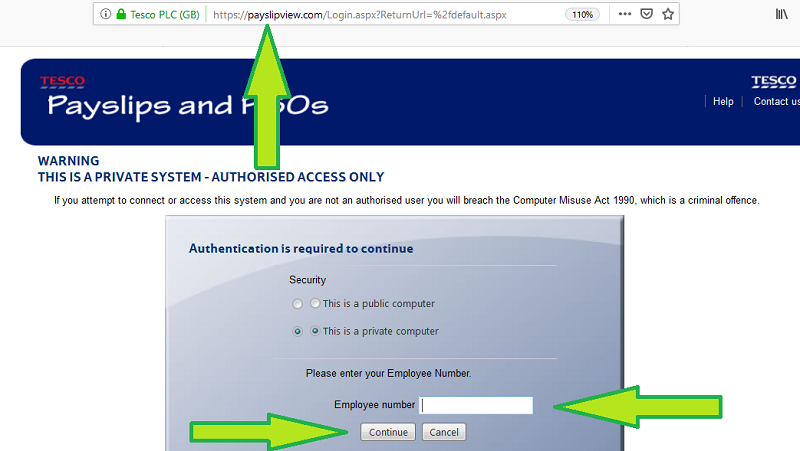
- To activate your Tesco payslip and p60 online, you must first go to the homepage at www.Payslipview.com.
- From there, you will be greeted with a login form, requesting your Employee Number.
- Enter your 8 digit Tesco Employee number (located under “address” on your payslip) and click ‘Continue’.
- On the next page, you will be able to enter the rest of your login credentials, including your password. One thing to be aware of is that you will need to enter an activation code to access your account. This activation code changes periodically, and the most recent code can be found on your most recent Tesco payslip.
- Enter the activation code and your date of birth. Then, enter a new password and confirm it, if the system ask for it. You are then logged in to the Tesco Payslip Inbox, where you can view and print payslips, and access your P60.
Tesco Ireland employees must log in at www.tescoirelandpayslips.com.
OurTesco.com Account Registration.
How do I create an OurTesco.com account?
To register for an account with OurTesco.com, go to the homepage and click on the ‘Register’ button in the top right hand corner. On the page that loads, you will need to enter your Employee Number, and select your role from a drop-down menu. You will also need to enter personal details and create a password.
Again, your password must contain at least eight characters, an upper case letter, a lower case letter and a number. Once you have completed the registration form, agree to the terms and conditions, and then click on the ‘Register’ button at the bottom of the page to complete the sign up process.
Our Tesco Login.
How do I log In to my OurTesco account?
To log in to your account, head over to the main homepage at www.ourtesco.com and then click the ‘Sign In’ button in the top right hand corner of the page. You will be presented with the main login form, where you will need to enter either your Employee Number or the email address you provided during registration, along with your password.
Once you have entered your login credentials, simply click on the ‘Sign In’ button underneath the login form. Assuming you entered the information correctly, you should be taken to your account.
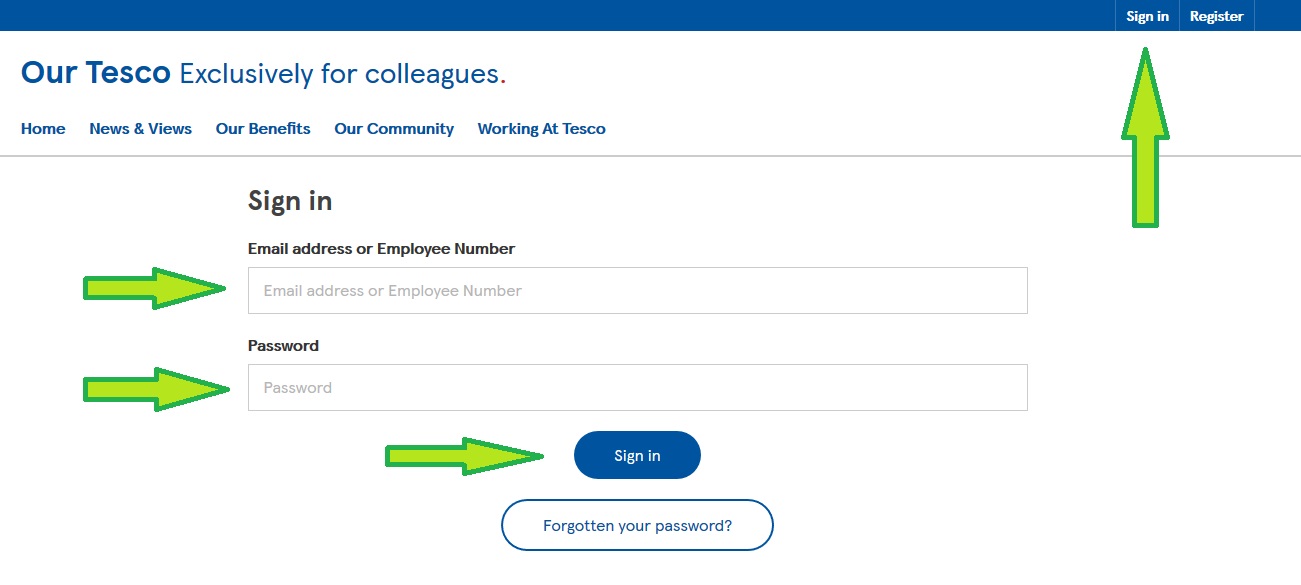
Then, click on “Sign In” and enter your login details.
Payslipview.com and OurTesco.com Login Problems
Tesco employees may occasionally run into issues when trying to log on to these services. Generally, the best approach here is to run through the following troubleshooting steps, so that you can identify the cause of the problem and also regain access to your account as soon as possible.
- The first thing to check is your own internet connection, so try loading another website. If it loads, your connection is not the problem.
- Next, you should ensure that you are definitely using the right credentials with the right login page, especially if you have a different password for Payslipview.com and OurTesco.com.
- Double check that you have entered your credentials properly, paying particular attention to possible typing errors. Make sure CAPS LOCK is turned OFF. Remember, your password is case sensitive, is at least eight characters long and must have a combination of upper case letters, lower case letters and numbers or special characters, so would may have chosen a different password from what you usually choose.
- If you have forgotten your password, you can reset it by visiting: https://www.ourtesco.com/login-assistance/.
- If you cannot open the Payslipview.com desktop login page, then try the mobile version at: https://payslipview.com/mobile/
Finally, should you still have issues, your device or web browser may be the cause. Steps you could try here include:
- Clearing your cache and browser data before trying again.
- Updating your web browser to the latest version
- Trying an alternative web browser, like Chrome and Mozilla.
- Attempt to sign in with a different device entirely, like a mobile phone, ipad, home or work computer.
Your Tesco Payslip Explained.
| Tesco Payslip Detail | Detail Definition |
|---|---|
| BASIC HOURS | Your weekly contracted employee hours at Tesco. |
| DEPARTMENT | Department that the staff memeber works in at their place of work. |
| EMPLOYEE NAME | Your employee name |
| EMPLOYEE NUMBER | A unique 8 digit unique reference number. Used with HR or Payroll. |
| HOURLY RATE | Your contracted hourly pay rate at Tesco. |
| HOURS | Weekly contracted hours at Tesco. |
| JOB CODE | The code which has been assigned to your job role. |
| NATIONAL INSURANCE CAT | The rate of National Insurance you contribute, indicated by a letter. |
| NATIONAL INSURANCE NO. | Unique 9 digit code made from 3 letters and 6 numbers., used to record National Insurance contributions as well as credits you have paid or are entitled to. |
| OCCUPATION CODE | The distribution code assigned to your job role. |
| TAX PERIOD | The current tax period or week. |
| TAX CODE | Your personal tax code – This determines your tax rate. |
| TAX REFERENCE | The company reference number, used by the tax office |
| PAYMENT METHOD | Your payment method, bacs,or cheque. |
| DATE | The date of the end of the current tax period/week. |
Getting Your Tesco P45.
Tesco P45’s are be printed out the following week after an employee has left the company, and then mailed to you by post.
Irish Employees: In 2019, as well as in the future, Tesco employees will no longer get a papaer P45, when they leave a Tesco job. Tesco will record the leaving date and final pay including deductions into Revenue’s system and employees can then access their P45 details through Revenue’s “myAccount”.
Tesco Employee Discounts
Tesco employees are provided with a range of employee benefits, including staff discounts. After six months of service, employees are eligible to receive a 10 percent colleague discount, which can be used at any Tesco store. Meanwhile, a Retirement Savings Plan matches pension contributions of up to 7.5 percent.
Other colleague benefits include sick pay, maternity pay and holiday pay.
You can find out about all employee benefits by visiting: https://www.tesco-careers.com/explore-our-world/benefits/
Tesco Payslipview HR Contact Information
If you need to contact the service team behind the employee portal, send an email to: [email protected].
Further useful contacts can be found by visiting: https://www.ourtesco.com/useful-contacts/
For activation or reactivation code requests for Payslipview.com, contact the Online Payslip Helpline on 01462 652 397 (or ext: 7891 65397). This line is available between the hours of 8am and 5pm, Monday to Friday. Alternatively, you can email the customer service team on [email protected] and request this information.
For all other queries related to payslips, P60s or the website itself, please contact your Line Manager or send an email to the following address: [email protected].

About Tesco.
Founded in 1919, Tesco is the largest supermarket chain in the United Kingdom, by market share, and one of the top ten largest retail companies in the world, in terms of revenue. In total, the business employs close to 500,000 people, while its shop portfolio exceeds 3,000 stores, including Tesco Extra, Tesco Express and Tesco Superstores.
About OurTesco.
Ourtesco.com is the Tesco employee portal. It is a website where Tesco employees can access a variety of information and resources, including:
- Company news and announcements
- Employee benefits and discounts
- Training and development opportunities
- HR information
- Job postings
- Paystubs and tax information
- Employee directory
- Company policies and procedures
To access Ourtesco.com, employees must log in with their Tesco employee ID and password. Once logged in, employees will be able to see a personalized dashboard with links to the resources and information that are most relevant to them.
Ourtesco.com is a valuable resource for Tesco employees. It provides them with a one-stop shop for all the information they need about their employment at Tesco.
Accessing Tesco Work & Pay / Payslipview
- Go to www.payslipview.com.
- Enter your Employee Number and select Continue.
- On the next screen, enter your Password (the one you created when you first registered) and your Activation Code.
If you can’t find your activation code, call the Online Payslip Helpline: 01462 652 397. For payslip or P60 questions, speak to your line manager first or email [email protected].
How to access the Tesco Colleague Login (OurTesco) and sign in
- Go to ourtesco.com and choose Colleague Login / Sign in.
- Enter your Employee Number or Tesco email and your Password, then select Sign in.
- If prompted for Two-Step Verification, follow the on-screen steps to enter your code.
- Forgotten your password? Use the Password reset link on the sign-in page, then check your email or SMS for the reset link/code.
- If you get an SSO/OneLogin error, return to ourtesco.com and start the sign-in again.
Tip: Passwords are case-sensitive—check CAPS LOCK.
Tesco Head Office Contacts.
Tesco HR Email Addresses are: (HR and Recruitment):
- UK Recruitment: [email protected]
- Booker Recruitment: [email protected]
- One Stop Recruitment: [email protected]
Tesco Head Office Telephone Number:
The Tesco Head Office Telephone Number is: +44 1992 632222
The Tesco Head Office mail address is:
Tesco House, Shire Park, Kestrel Way, Welwyn Garden City, AL7 1GA, United Kingdom
Other Useful Emails
- Online Payslips Support: [email protected]
- Reference Requests / External Enquiries: [email protected]
- Press Office: [email protected]
Tesco PLC Address.
The official Tesco Main Office address is:
Tesco House
Shire Park, Kestrel Way,
Welwyn Garden City,
Hertfordshire AL7 1GA,
Britain
Tesco Payslip FAQ — Complete Guide (2026)
This guide answers the most common Tesco payslip questions based on real colleague queries, official help pages, and payroll practices. Everything is explained clearly so you can understand your pay, fix issues, and access your payslips without confusion.
What is Tesco PayslipView?
Tesco PayslipView is an online system that allows Tesco employees to view and download their payslips digitally. It was one of the original platforms used for accessing payroll information outside of the store environment. Through this system, employees could securely log in using their employee number and password to check their earnings.
However, Tesco has been transitioning away from PayslipView in recent years. The system is gradually being replaced by the My Tesco Colleague app and the OurTesco portal. While some employees may still access PayslipView, new users are encouraged to use the updated platforms.
How do I access my Tesco payslip in 2026?
The main way to access your payslip in 2026 is through the My Tesco Colleague app. After logging in, go to the menu, tap Documents, and then select Pay to view your payslips. This is the fastest and most reliable method.
You can also access your payslips via a browser by visiting OurTesco and logging in with your colleague credentials. Both the app and website provide access to the same PDF payslip documents.
If you are in Ireland, you must use a separate system via tescoirelandpayslips.com, which requires an activation code from your first payslip.
How do I log in to Tesco PayslipView?
To log in, go to the PayslipView website and enter your Tesco employee number along with your password. This gives you access to your payroll details, including current and past payslips.
If you are unable to log in, double-check your credentials and ensure your account is still active. Tesco is phasing out this system, so access may not be available to all employees.
If PayslipView does not work, switch to the My Tesco app or OurTesco portal immediately to avoid losing access.
What information is included on a Tesco payslip?
A Tesco payslip contains detailed financial and employment information. This includes your name, employee number, tax code, National Insurance number, and pay period.
It also shows a full breakdown of earnings such as basic pay, overtime, bonuses, night premiums, and any additional allowances. Deductions like tax, National Insurance, and pension contributions are also clearly listed.
The final section shows your net pay, which is the amount transferred to your bank account, along with year-to-date totals.
Why have my payslips disappeared from Work & Pay?
Tesco has been migrating away from the Work & Pay system, which was based on Oracle software. As part of this transition, many employees noticed their payslips disappearing from that platform.
Your payslips should now be available through the My Tesco Colleague app or the OurTesco portal. These are the official replacement systems for payroll access.
If your historical payslips are missing, contact your store admin or raise a request through the colleague help portal to retrieve them.
How do I download my Tesco payslip?
You can download your payslip directly from the My Tesco app or the OurTesco website. Simply open the payslip and select the download or share option to save it as a PDF file.
Downloading payslips regularly is highly recommended, especially during system transitions. Keeping your own copies ensures you always have access even if systems change.
Store your files securely, as payslips contain sensitive personal and financial data.
What should I do if I forgot my Tesco payslip password?
If you have forgotten your password, use the password reset option on the login page. You will need to enter your employee number and follow the instructions sent to your email.
Make sure you have access to your Tesco colleague email, as this is usually required for verification. If you cannot access your email, contact your manager or HR support.
Password resets are usually quick, but if issues persist, use the colleague help portal for assistance.
Why does my payslip show fewer hours than I worked?
This is usually due to unpaid break deductions. Tesco automatically deducts break time from your total hours based on shift length.
Another common reason is the payroll cutoff. Hours worked close to payday may not appear until the next payslip.
If the difference cannot be explained by these factors, raise a pay query immediately with your store admin.
Night premium is extra pay for hours worked between midnight and 6am. It is paid in addition to your standard hourly rate and appears as a separate line.
The exact rate may vary but is typically around a few pounds per hour. Only the portion of your shift within that time window qualifies.
If you work overtime overnight, you may also see a separate night overtime premium line.
What does corrections mean on my Tesco payslip?
Corrections indicate adjustments from previous pay periods. These may include missed payments, overpayments, or administrative fixes.
The correction can either increase or decrease your pay depending on the situation. Tesco uses this line to balance previous payroll discrepancies.
If you do not understand a correction, always ask your store admin for a detailed explanation.
When are Tesco payslips released?
Payslips are usually released on or just before payday. Most employees receive them around the end of the month, depending on their contract.
There is no fixed time of day, so availability can vary. Some employees see them appear a day earlier than the payment itself.
If your payslip has not appeared after payday, contact your store admin or HR support.
Can I view my Tesco payslip on my phone?
Yes, the My Tesco Colleague app is designed specifically for mobile access. It allows you to view, download, and manage your payslips easily.
You can also use a mobile browser to access the OurTesco website. Both options provide the same information.
The app is generally faster and more convenient for everyday use.
Can I use my Tesco payslip as proof of income?
Yes, Tesco payslips are valid proof of income for renting, mortgages, and financial applications. The PDF format includes all required details.
It shows your earnings, deductions, and personal details clearly. Most institutions accept it without issue.
If additional documentation is needed, you can request an earnings statement from HR.
How long are Tesco payslips stored?
Typically, Tesco stores payslips for around 24 months in their systems. However, availability may vary depending on system changes.
Because of this, it is strongly recommended to download your payslips regularly. Do not rely solely on company systems for long-term storage.
Keeping personal backups ensures you always have access when needed.
How do I raise a pay query at Tesco?
Start by speaking to your store admin or wage clerk. They can submit a pay query form on your behalf.
If the issue is not resolved, use the colleague help portal to contact HR directly. This ensures your query is formally recorded.
Always keep records of your request and follow up if necessary until the issue is resolved.
What happens if Tesco pays me incorrectly?
If you are underpaid, Tesco must correct it in the next payroll cycle. Raise the issue immediately and provide any supporting evidence.
If you are overpaid, Tesco may arrange repayment, usually through future payslip deductions. They should inform you before doing so.
If issues are not resolved, you can seek advice from ACAS or your union representative.
How do I get my Tesco payslip after leaving Tesco?
Your final payslip is usually sent to your home address after leaving. Make sure your contact details are up to date before you leave.
You will lose access to internal systems, so download all documents before your last day. This includes payslips and your P60.
If needed, contact Tesco HR to request copies after leaving.
www.Payslipview.com Feedback.
Share your experiences, questions and complaints about the Tesco Payslipview website, in the comment section below.
What is the phone number for a new activation code, as I cant access my pay slip online?
For activation codes or reactivation code requests, contact the Tesco Online Payslip Helpline on 01462 652 397 (or ext: 7891 65397), 8am – 5pm Monday to Friday, or simply email: payslipview @ tesco.com
For queries about payslips, P60s, contact your Tesco Line Manager or email: online.payslips @ tesco.com.
Email no longer working, says not monitored after April.
I need to get a new activation code, because the one in my payslip is incorrect apparently. Do I really have to wait until Monday before I can actually get a new code?
Number doesn’t work
Can I have my active code to check my pay slip please
Your activation code will be at the bottom of your last paper payslip. If it does not work, then contact Tesco HR
Am trying to change my password today but the system is not allowing me..Please help me to be able to sign again
I need my Tesco p45 a s p as I cant get housing benefit,so I really need it. thank you.
If you have not received a P45 from Tesco, you will need to speak with the Personnel Manager in store.
P45’s are be printed the following week after you left, and then sent to you.
For Irish workers: For the year 2019 and in the future, employees will no longer get a P45 when they leave a Tesco job. Tesco will enter the leaving date and final pay including deductions into Revenue’s system and you can then access the details through Revenue’s “myAccount”.
Is it possible to get the original Tesco paper pay slips?
Can I get my paper payslip back
Am trying to change my password today but the system is not allowing me..
Very frustrating, Payslip View always locks me out ??
I would like my pay slip posted. I allways have problems.
Do you get tax relief on your retirement savings SMARTT because I don’t seem to have any deductions on my p60 for it
For the past two months l have not been unable to access my pay slip, it keeps telling me that I have entered incorrect details five times , this occurs even when only trying to access only once . I am using the same details as I have always used without any problems up to now. Can you please advise how to resolve this continuing problem.
Unable to access my payslip
I can’t view my payslips. I given new password, but system locked me out
How do I get a P45 please
How can I login to my pay slips as I have been made redundant and now taking my Tesco pension have a new number for my pension (not an employee number
Bring back straight forward posted/collected payslips !!!!!!!! i earn it i should by rights see what i have been paid into my bank,what happens to other employees wage slips who have no internet,why should i waste my credit on my phone.
How can I change my employee number as I have been made redundant and am now taking my pension have been giving an employee number and an activation code thank you waiting for your reply.
Literally every other employer simply emails payslips. This is the most ridiculous idea ever.
My online payslip is locked out. It says l need to contact personnel. How do l do this pls.
I understand the need to go digital with payslips but why would you make a digital option so hard to access. Every month I am refused access! I know the details I am entering are correct & yet every time I have to ring for an access code. Please sort it out, it’s frustrating
It is nearly five payrolls since i viewed now i have tried to view my pay slip it has locked me out for one hour telling me i have five unsuccessful attempts . Paper wages slip was better .
I am sick to the back teeth with this system
It continually locks me out………pleas can we have simple access to our wages ie..paper wage slips
Invest the money on that and not useless monthly books that I know everyone at my store complains
What a waist of paper..time & money..
i am trying to view my payslip and not being allowed any access into the website is there an alternative?
also noticed on my first payslip the i was not even my total amount of hours i worked is that only for the first payslip as that is very relevant information that should be on the payslip.
Why is Tesco NOT SHOWING TOTAL HOURS WORKED!!?? This became law in April this year. This is the second time I have asked this, maybe it’s time to involve the union!
My security question won’t work, how do I change it?
Why is Tesco not showing my total number of hours worked???
I am a tesco member of staff trying to look at my wage slips but once again the stupid system is telling me that my password and security questions are invalid. This is the 3rd time this has happened can tesco please solve this problem because its starting to get old now, because you can’t even look at your wages. Can’t we just go back to paper copies? There was no problem with that system.
I find it impossible to log in when there is no space that says login , I have spent 20 mins trying all the different portals but to no avail. this is so complicated if you are not completely sassy on a computer
I have always been able to get my pay slip on my iPad the last 2 month’s it is not allowing me to to do so . I am able to sign on at work on the works computer now after the manager sent an email to you to save it wouldn’t allow me to do that ,and it now seems to have effected my iPad .please help
Hi i am trying to activate my pay slip account but everytime when I put the text it says incorrect. Can you pls help me with that pls x
Still can not get wage slip. Not had payslip for 3 yrs, and would like someone to send all my wage slips as the Payslipviw.com website does not work
Please contact Tesco HR directly for access to older Tesco payslips.
Hi I can’t access with my activation code, can Tesco reset for me pls? I was short term contract for covid.
What is the number for hmr?
I am trying to register but when I enter the captcha code its says I have typed it wrong and kicks me out – please advise
It seems that loads people having same problems but getting no response from anyone about why we can not get our wage slips on line so wot going on is our money being messed about with? come on get ur fingers out ur bk side and sort this out it’s been going on WAY to bloody long now. And yes I DO put in the right details
Where can i access my P45 it says Tesco will record the leaving date and final pay including deductions into Revenue’s system and employees can then access their P45 details through Revenue’s “myAccount”. but i cant find it anywhere
This is a joke surely. Have never been able to access pay slips, even got new phone and still cannot get them..
Completely illegal not getting payslip .. and yes i put correct answers in and still get kicked out for 15 minutes or move with first attempt.. payslips should never have gone on line… This needs sorted sooner than later i want my payslip each and every month but not seen one since they went online.. Maybe lawyers need to investigate it.